DHCP Server2015/01/13 |
|
Configure DHCP ( Dynamic Host Configuration Protocol ) Server.
If you make your linux computer DHCP server, disable DHCP function on routers and so on in LAN.
|
|
| [1] | Install and configure DHCP. |
|
[root@dlp ~]# yum -y install dhcp [root@dlp ~]# cp -f /usr/share/doc/dhcp*/dhcpd.conf.sample /etc/dhcpd.conf
[root@dlp ~]#
vi /etc/dhcpd.conf # line 4: specify your network and subnetmask subnet 10.0.0.0 netmask 255.255.255.0 {# line 7 : specify default gateway option routers 10.0.0.1 ;# line 8: specify subnetmask option subnet-mask 255.255.255.0 ;# line 10: specify NIS domain name iy you using # comment out if you do not use. option nis-domain "srv.world" ;# line 11: specify domain name option domain-name "srv.world" ;# line 12: specify IP address of DNS option domain-name-servers 10.0.0.30 ;# line 14: comment out # option time-offset -18000; # line 21: specify the range of IP addresses for clients range dynamic-bootp 10.0.0.200 10.0.0.254 ;# line 22: default terms of lease default-lease-time 21600 ;# line 23: maximun terms of lease max-lease-time 43200 ;# line 26-30: comment out # host ns { # next-server marvin.redhat.com; # hardware ethernet 12:34:56:78:AB:CD; # fixed-address 207.175.42.254; # } /etc/rc.d/init.d/dhcpd start Starting dhcpd: [ OK ] [root@dlp ~]# chkconfig dhcpd on
|
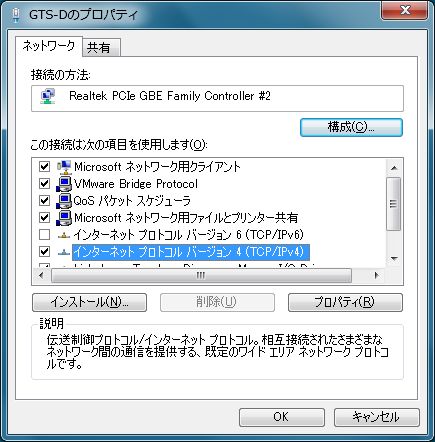
| [2] | Configure on client. This example is on Windows 7. Open Network settings and go to the sacreen like below. |
|
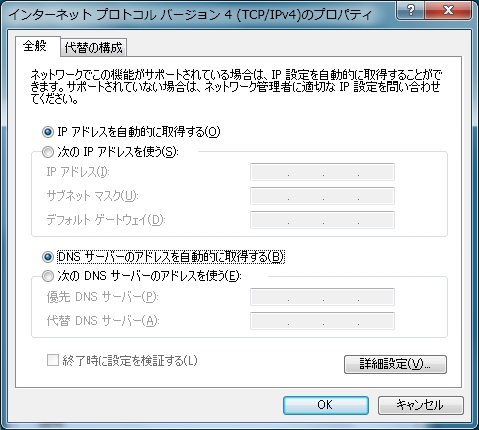
| [3] | Check boxes like below, then IP address is re-configured automatically. |
|
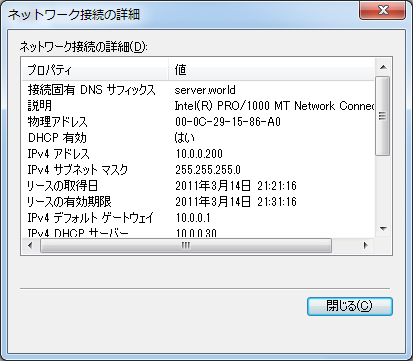
| [4] | See the network status. Automatical configuration is done. |
|
Matched Content