Configure WebDAV2015/01/17 |
|
This is the example of setting WebDAV with SSL connection.
|
|
| [1] | For example, Make a directory [webdav] and it makes possible to connect to WebDAV directory only by SSL. |
|
[root@www ~]# mkdir /home/security [root@www ~]# chown apache. /home/security [root@www ~]# chmod 770 /home/security
[root@www ~]#
vi /etc/httpd/conf.d/webdav.conf
Alias /share /home/security
<Location /share> DAV On SSLRequireSSL Options None AuthType Basic AuthName WebDAV AuthUserFile /etc/httpd/conf/.htpasswd <LimitExcept GET OPTIONS> Order allow,deny Allow from 10.0.0. # IP address you permit to access Require valid-user </LimitExcept> </Location> htpasswd -c /etc/httpd/conf/.htpasswd cent New password: # set password Re-type new password: # confirm Adding password for user cent [root@www ~]# /etc/rc.d/init.d/httpd restart Stopping httpd: [ OK ] Starting httpd: [ OK ]
|
| [2] |
For WebDAV Clients' settings, for example, it's the settings to use "CarotDAV" on Windows 7.
|
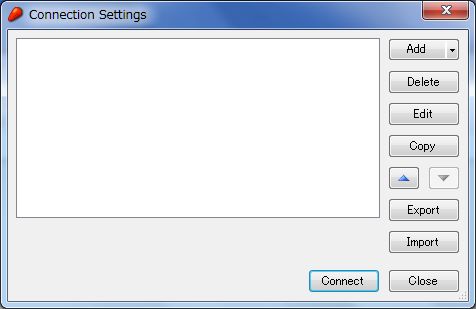
| (1) | Download CarotDAV from the site below. ⇒ http://www.rei.to/carotdav_en.html After downloading, Install and start CarotDAV, then the following screen is shown, Click the 'Add' button and select 'WebDAV'. |
|
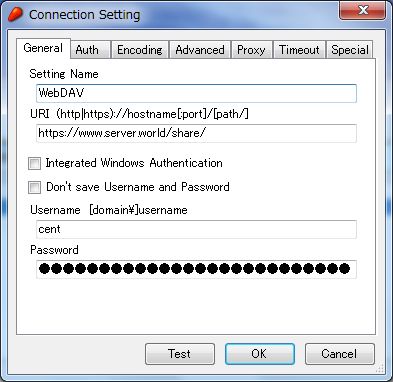
| (2) | Input any name in 'Setting Name' field and input [server name:webdav directory] in 'URI' field and input user name and password like follows. |
|
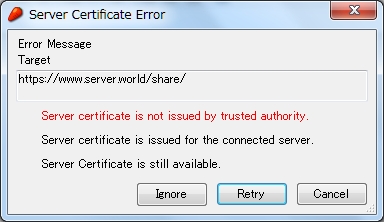
| (3) | The waring is shown like follows, it's SSL certificates is not installed on your PC, it's no ploblem, Click 'Ignore' and go next. |
|
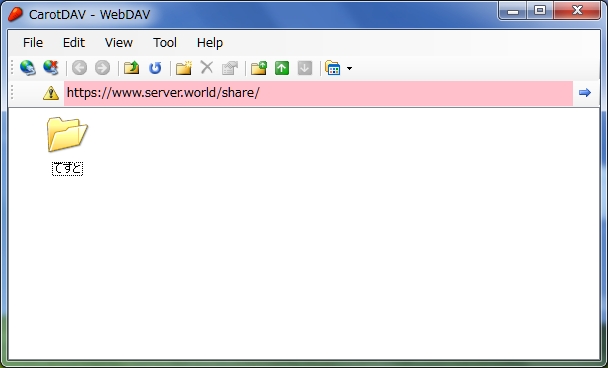
| (4) | Just accessed. |
|
Matched Content