Apache Log Analyzer - Visitors2011/06/25 |
|
Install Apache log analizer, Visitors.
|
|
| [1] | Install Visitors |
|
[root@www ~]#
[root@www ~]# wget http://www.hping.org/visitors/visitors-0.7.tar.gz tar zxvf visitors-0.7.tar.gz [root@www ~]# cd visitors_0.7 [root@www visitors_0.7]# make [root@www visitors_0.7]# cp visitors /usr/local/bin/ [root@www visitors_0.7]# [root@www ~]# mkdir /var/www/html/visitors
[root@www ~]#
vi /etc/httpd/conf.d/visitors.conf # create new
<Location /visitors>
Order Deny,Allow Deny from all Allow from 10.0.0.0/24 # IP address you allow </Location>
[root@www ~]#
/etc/rc.d/init.d/httpd restart Stopping httpd: [ OK ] Starting httpd: [ OK ]
# generate common reports [root@www ~]# visitors -A /var/log/httpd/access_log -o html > /var/www/html/visitors/index.html
--
11 lines processed in 1 seconds 0 invalid lines, 0 blacklisted referers # generate page tour reports [root@www ~]# visitors -A -m 30 /var/log/httpd/access_log -o html --trails --prefix http://www.srv.world > /var/www/html/visitors/trails.html
--
11 lines processed in 1 seconds 0 invalid lines, 0 blacklisted referers # generate page tour image [root@www ~]# visitors /var/log/httpd/access_log --prefix http://www.srv.world -V > /var/www/html/visitors/graph.dot -- 11 lines processed in 1 seconds 0 invalid lines, 0 blacklisted referers [root@www ~]# dot -Tpng /var/www/html/visitors/graph.dot > /var/www/html/visitors/graph.png
|
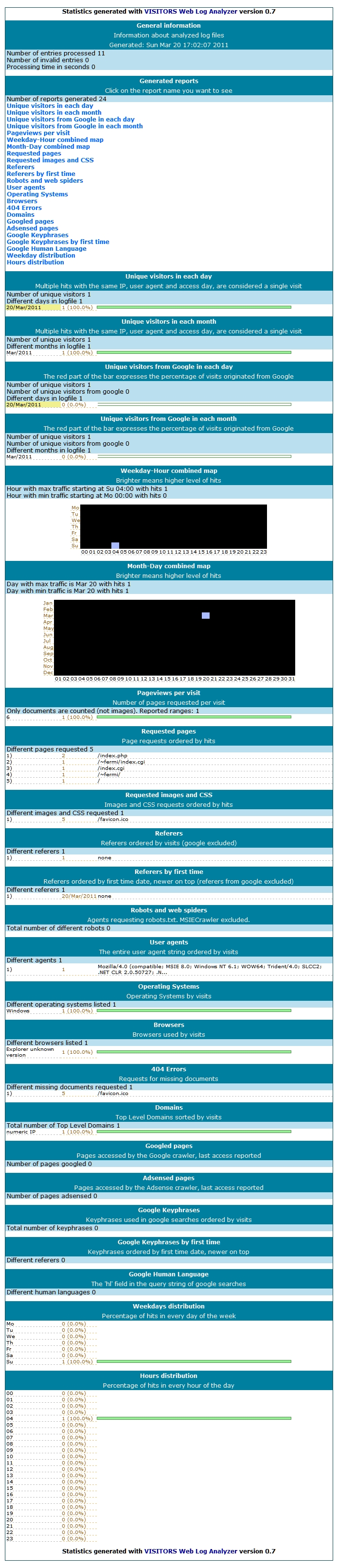
| Access to 'http://(your server's name or IP address)/visitors/', then following screeen is shown and it's possible to see httpd's log. |
|
⇒ http://(your server's name or IP address)/visitors/graph.png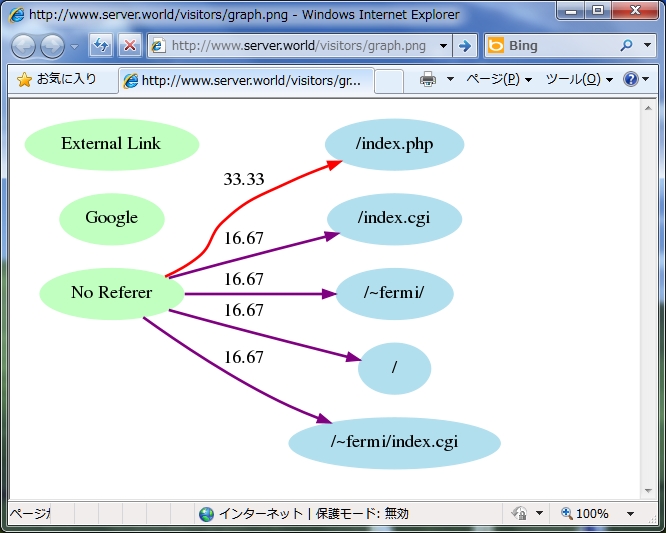
|
Matched Content